You Can't Protect What You Can't See: Building an OT Asset Inventory
Ask most industrial sites how many devices are on their control network and you will get an estimate, a spreadsheet from the last major project, or a polite silence. That is not a criticism; OT environments grow over decades, through upgrades, contractors and emergency fixes. But nearly every security decision you will make depends on knowing what you have, so an accurate asset inventory is where serious OT security starts.
Why the inventory comes first
An asset inventory is not paperwork for its own sake. It is the reference that every other security activity leans on:
You cannot tell whether a new vulnerability affects you without knowing which models and firmware versions you run.
You cannot lay out sensible network zones without knowing which devices exist and what they talk to.
You cannot respond quickly to an incident if nobody knows what a suspicious IP address belongs to or who owns it.
Government guidance reflects this. In August 2025, CISA, together with US and international partner agencies, published "Foundations for OT Cybersecurity: Asset Inventory Guidance for Owners and Operators," which encourages organizations to build and maintain an OT asset inventory supported by a clear taxonomy of their systems. The message is consistent across most frameworks, including the IEC 62443 series: visibility comes before protection.
What to capture for each asset
A useful inventory goes well beyond a list of IP addresses. For each device, aim to record:
Make and model: manufacturer, product line and model number
Firmware and software versions: including operating system and patch level for Windows-based hosts
Network identity: IP address, MAC address, hostname and VLAN
Protocols and services: which industrial and IT protocols the device uses or exposes
Physical location: site, building, room, cabinet or panel
Function and criticality: what the device does in the process and what happens if it fails or is manipulated
Owner: the person or team responsible for it, often different from whoever maintains the network
Connections: which other systems it communicates with, and any remote access or external paths
Not every field will be filled on day one. Start with what you can confirm, mark what is uncertain and improve it over time. A partly complete inventory that people trust is better than a perfect one that never gets finished.
Where the information comes from
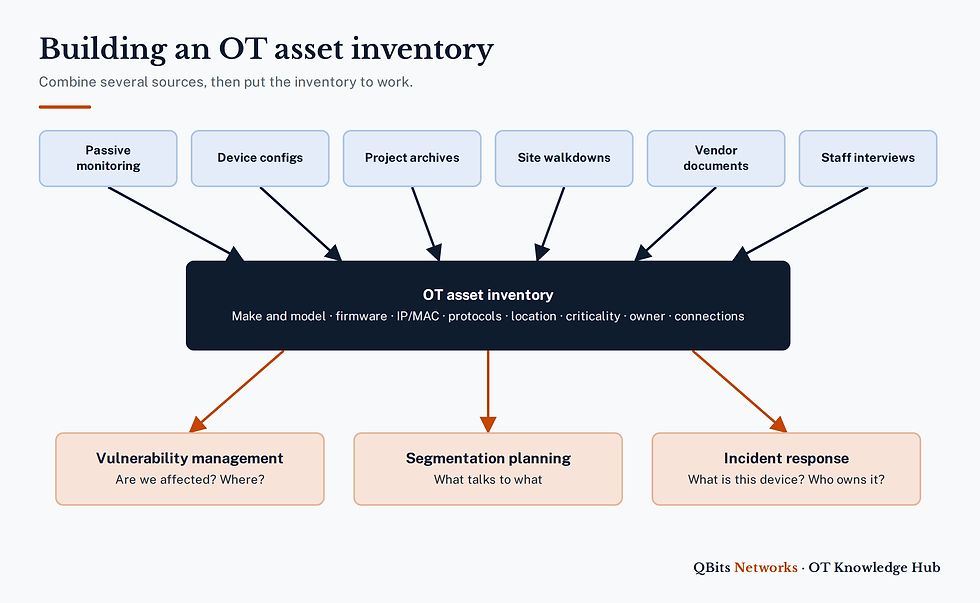
No single source gives you the whole picture. The most reliable inventories combine several:
Passive network monitoring: capturing traffic from SPAN or mirror ports reveals active devices, their protocols and often their vendor, model and firmware, without sending a single packet to fragile equipment.
Configuration files: switch, router and firewall configurations show addresses, VLANs and permitted flows.
Project archives: controller programs, HMI projects and as-built documentation from past projects describe what was installed and how it was set up.
Walkdowns: physically checking cabinets, control rooms and remote sites finds devices that are powered off, serial-only, rarely communicate or were never documented.
Vendor documentation and support portals: these confirm model details, supported firmware and end-of-life dates.
Interviews: operators and controls staff know which systems matter most and which ones have quirks.
Passive monitoring is a good starting point because it shows what is really happening on the network today. Walkdowns and documents fill the gaps, especially for serial devices and equipment that only communicates occasionally.
Keeping it current
An inventory that is accurate on the day it is finished and stale six months later is a common outcome. To avoid it:
Tie it to change management: no device is added, replaced or reconfigured without the inventory being updated as part of closing the work order.
Use continuous or periodic monitoring: a passive monitoring platform, or repeat captures at set intervals, will flag new or changed devices.
Assign ownership: someone must be accountable for the inventory as a whole, with asset owners responsible for their own entries.
Review on a schedule: reconcile the inventory against monitoring data and site records at least annually, and after major turnarounds or projects.
Store it securely: an OT asset inventory is a useful map for an attacker, so control who can read and change it.
Putting the inventory to work
Vulnerability management
When a security advisory is published for a particular controller or HMI product, a good inventory lets you answer within minutes whether you are affected, where those devices are and how exposed they are. Combined with criticality ratings, it also tells you which ones to address first.
Incident response
During an incident, responders need to know quickly what a device is, what it controls, who owns it and what it normally talks to. An inventory with communication baselines makes it far easier to spot what has changed and to make informed decisions about isolation without shutting down more of the process than necessary.
Planning and lifecycle
The same data supports segmentation planning, spare parts strategy and budgeting for replacement of unsupported equipment, which helps build the business case for security improvements.
How QBits Networks can help
Our OT visibility snapshot uses a time-boxed passive capture from a SPAN or mirror port to show what is on your network and how it communicates, giving you a solid starting point for an inventory. For a broader view, our passive-first OT security assessments combine that capture with configuration review, interviews and walkdowns. Tell us what you need through our contact page and we'll scope it with you.